

MCP Server
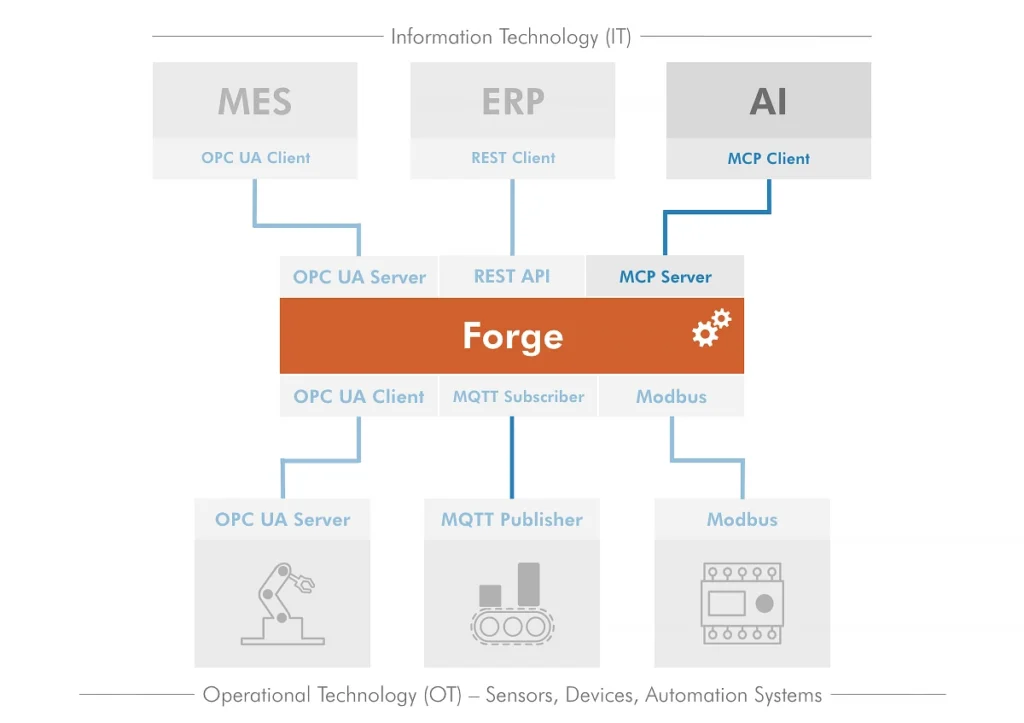
Prosys Forge has a built-in MCP (Model Context Protocol) server that connects Forge to large language models. Through it, AI agents get direct access to real-time and historical data from the Forge OPC UA address space. Agents can also read and change Forge’s own configuration, across every module. Use the MCP server to query data in natural language, investigate anomalies, create ad-hoc reports, set up and adjust connections, and build AI-powered workflows on top of your existing Forge infrastructure.
Raw data feeds give AI only values. The OPC UA information model also gives it the context it needs to interpret data reliably and with fewer errors. The configuration API gives AI the same structured view of how Forge itself is set up.
Key Benefits
Instant AI Access to Process Data
Natural Language Queries
Analysis Through Semantic Context
Information models power AI with structured context for every data point, reducing misinterpretation and accelerating analysis.
Controlled and Auditable by Design
Use Cases
1. Mapping Large Structures
Describe the target structure once and let the agent build it. It can map hundreds of PLC tags, Modbus registers or BACnet objects into a clean OPC UA information model, and repeat the pattern across every line, machine or device. Tasks that take hours of manual clicking are done in one conversation.
2. Commissioning New Devices
Give the agent an IP address, a device type and a tag list or register map. It creates the connection, sets up the tags and checks that values are arriving. When several devices share a template, the agent can create the whole set in one go.
3. Troubleshooting Connections
Ask why data has stopped flowing. The agent checks connection states, reads the relevant configuration and compares it with what the address space shows. It then explains the cause, such as a wrong endpoint, an expired certificate or a disabled module, and with write access it can propose and apply the fix.
4. Reports from Historical Data
Ask for a daily production summary, a shift comparison or the five largest deviations of the past week. The agent reads the history, does the analysis and writes the report in plain language. No exports or spreadsheets are needed.
5. Setting Up Data Pipelines to IT and Cloud
Tell the agent which data should go where, for example “publish line 3 temperatures to MQTT every 10 seconds” or “log alarms to the SQL database”. It configures publishers, loggers and history collection, and maps the right nodes to topics, tables or files.
6. Configuration Review and Documentation
Have the agent go through the whole configuration and produce an inventory of connections, data flows and assets. It can flag inconsistencies, such as unused connections, mismatched sampling intervals or nodes with no history. With read-only access, the configuration stays exactly as it is.
7. Building Dashboards
Describe what you want to see, for example “a dashboard for line 3 with live temperatures, pressure trends over the last shift and an alarm list”. The agent finds the right nodes, picks suitable widgets and lays out the dashboard. You can refine it in conversation (“add a gauge for tank level”, “make the trend show 24 hours”), or have the agent make a matching dashboard for every line from the first one.
FAQ
1. Which AI LLM vendors support MCP?
MCP is an open protocol developed by Anthropic, and support is growing rapidly across the industry. Claude, ChatGPT, Copilot have native MCP support, and the protocol is compatible with any LLM platform or client that implements the MCP standard — including a growing number of open-source and enterprise AI tools. Because MCP Server exposes a standards-based MCP endpoint, it is not tied to any single vendor.
2. Does MCP Server allow AI models to write data back to the OPC UA address space?
It’s recommended that the AI Suite provide read-only access to the address space. Write access can be configured separately and is subject to the same access policies that govern other Forge connections.
3. Can AI change the Forge configuration?
Yes. With the Config Write tool group on, an agent can create, update, start, stop and delete configuration in any module that module access opens for writing. The agent’s user also needs the Edit permission. Configuration reads and writes are enabled separately, so you can let AI inspect and troubleshoot your setup without letting it change anything.
4. How do I limit what an AI agent can reach?
There are three layers. Tool groups decide what kinds of actions are available. Module access decides which modules agents can see or change. User and API-key permissions narrow access further for each agent. The strictest of these always applies.